Free modulated delay
Vapor Echo.
Give your echoes a new character.
Warm repeats, pitch modulation and a slot for your own VST3 effect. Follow your DAW's tempo or tap in a rhythm.
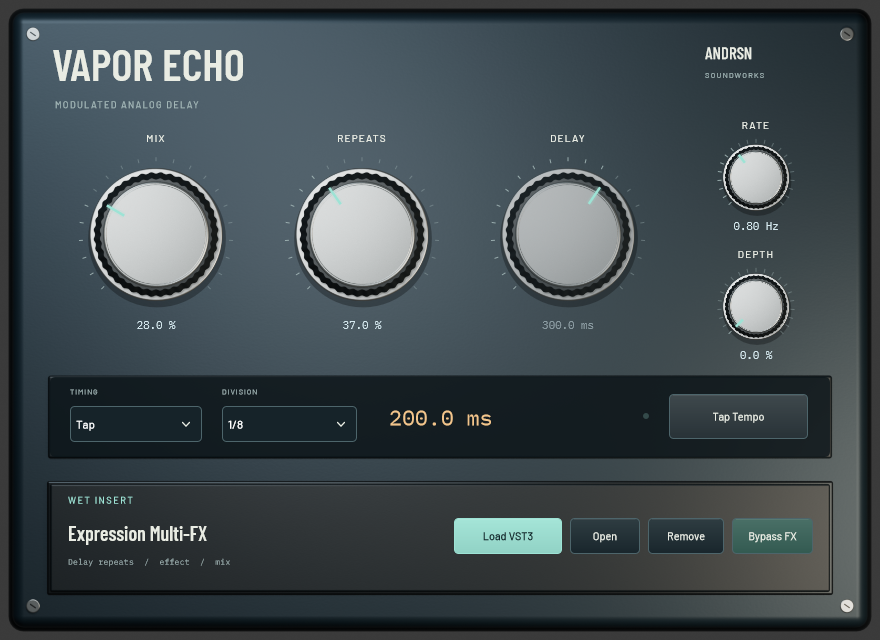
Your effect. On the echoes.
Load a VST3 effect inside Vapor Echo and open its controls from the wet insert bay. The effect processes the delay repeats before Mix blends them with your dry audio. Its settings are saved with your DAW project.
- Load your own effect
- Use Load VST3 to choose an installed mono or stereo audio effect. Open its editor, bypass it or remove it from the slot.
- Play with time
- Set 15–600 ms in Free mode. Use DAW Sync or Tap Tempo with note divisions for delays up to 12 seconds.
- Add movement
- Rate and Depth bring pitch movement to the repeats. Repeats takes the delay from a single echo into self-oscillation.
The inserted effect processes the echoes after the delay's internal feedback, before they reach the Mix control.
Vapor Echo 0.4.0
Download free.
No account, checkout or activation key. The VST3 effects you load retain their own licensing requirements.
The Windows plug-in is unsigned.
VST3 + Audio Unit
Add it to your DAW.
Install on Windows
Quit your DAW, unzip the download and copy the entire Vapor Echo.vst3 folder to C:\Program Files\Common Files\VST3. Reopen your DAW and rescan plug-ins if needed.
Install on macOS
Quit your DAW. Copy Vapor Echo.vst3 to /Library/Audio/Plug-Ins/VST3, or copy Vapor Echo.component to /Library/Audio/Plug-Ins/Components for an Audio Unit host such as Logic Pro. Reopen your DAW and rescan plug-ins if needed.
Use the wet-effect slot
Choose an installed 64-bit VST3 audio effect with Load VST3. This slot uses VST3 effects on both platforms, including when Vapor Echo itself runs as an Audio Unit. Keep that effect installed to recall it in saved projects. The loaded effect adds its own CPU load, memory use and processing latency.