Granular multi-effect plug-in
Alluvium.
Your sound. Unexpected directions.
Turn live audio into shifting rhythms, granular textures, and wide stereo movement. Capture a moment, reshape it, and keep playing.
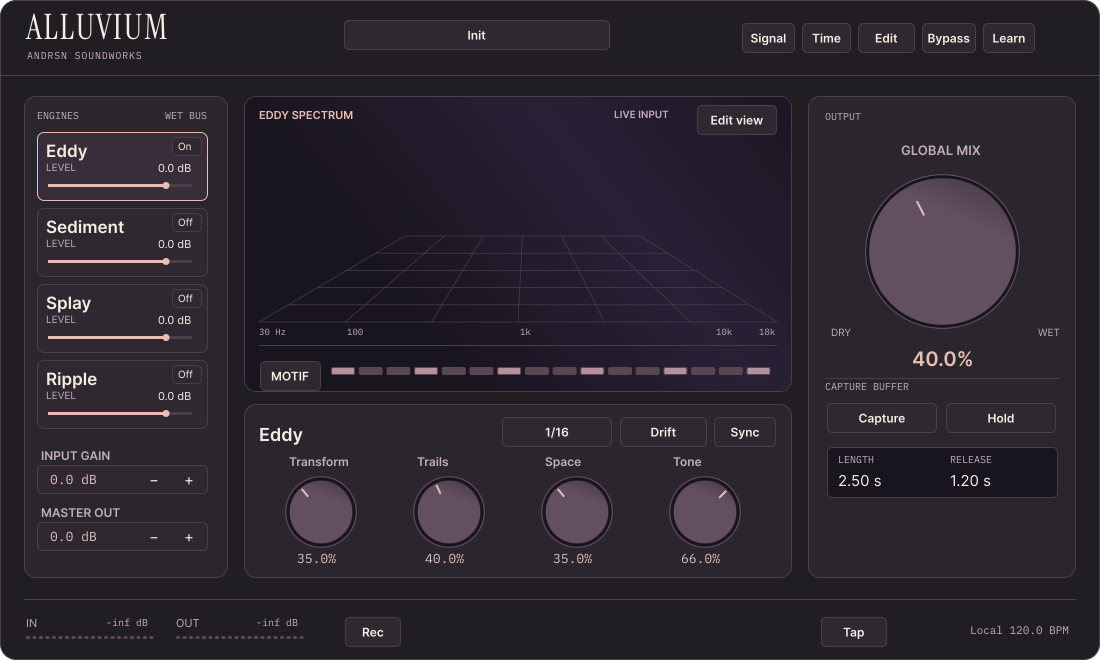
Alluvium browser demo
Play the included loop to hear Eddy. Toggle Dry audio to compare the original, then use the engine rack to turn Splay on and off. Select an engine’s name to edit its controls.
OUTPUT
DRYWET
Meet the four engines.
- Eddy
- Slices incoming phrases into tempo-based patterns. Try it on a strummed chord or drum loop to hear the attack become part of a new rhythm.
- Sediment
- Layers overlapping grains into a wash. Use Trails to let a chord or sustained note linger as a texture.
- Splay
- Scatters short grains across the stereo field. Use Spread to widen a sound and Grain Size to change the length of the fragments.
- Ripple
- Uses tempo-based delay taps to make repeating patterns. Spread moves the echoes across stereo and Feedback keeps them repeating.
Performance controls
Keep playing.
- Capture & Hold
- Grab the audio you just played and sustain it while you play over it. Map Capture, Hold and Transform to a MIDI controller.
- Tempo & motifs
- Sync to your DAW or tap a local tempo. Build a one-bar pattern with single, double or triplet hits.
- Wet voices & recording
- Blend original, octave-up and octave-down voices. Record matching dry and processed WAVs for later edits.
Get Alluvium.
$49.99 USD
One-time license purchase. Sign in to buy and find your license key in your order history.
Plug-in downloads
Install and activate.
Alluvium runs as an audio effect in a DAW that supports the plug-in format for your platform.
Install in your DAW
- Windows
- Quit your DAW, unzip the download and copy the entire
Alluvium.vst3folder toC:\Program Files\Common Files\VST3. - macOS
- Quit your DAW and open the DMG. Copy
Alluvium.vst3to/Library/Audio/Plug-Ins/VST3orAlluvium.componentto/Library/Audio/Plug-Ins/Componentsfor an Audio Unit host such as Logic Pro or GarageBand.
Reopen your DAW, rescan plug-ins if needed and add Alluvium as an audio effect on a track.
License and offline use
Paste your license key into the plug-in while connected to the internet. Your license allows three device activations per release. An activated device can run offline for up to 30 days before it needs to reconnect. See the purchase terms for how updates affect older activations.